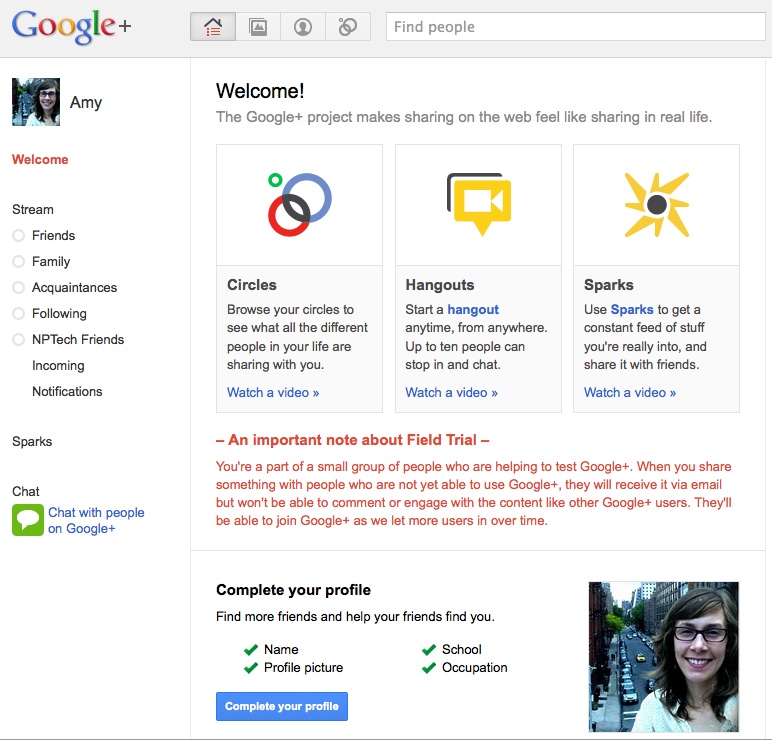
Google+, the latest iteration on social networking from Google, is here.
There are bound to be many, many versions of this blog post as people from around the world start investigating the tool and sharing their impressions. As always, when it’s just the first trickling of people joining up, the way the tool is used, the depth of some functionality, and the technical issues are all a bit out of proportion. With all of that as a grain of salt to this post, I want to share a few reflections focused on security and control – the items touted ahead of launch as the elements positioning Google+ on the other side of Facebook.
Privacy
It may seem strange to users who are new to Google tools, but the Google+ privacy settings are tied in to all of your Google account privacy settings. (Check your settings now if you want!) In some ways, this could be confusing to people who’ve become accustomed to Facebook’s approach which has layers of settings and changes those layers, options, and controls all of the time. Now, your sharing and connecting settings apply to much more of the web than just your social networking profile.
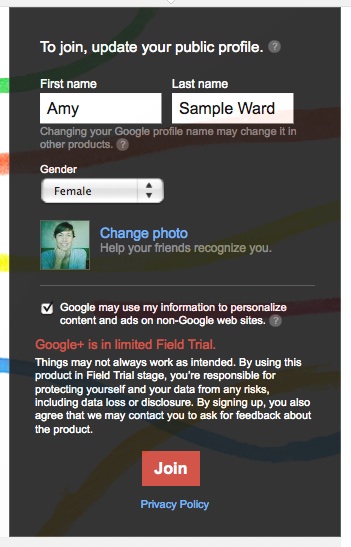
When joining, the presence of ad-recommending data was very clear. Check out the invite screen shot below:
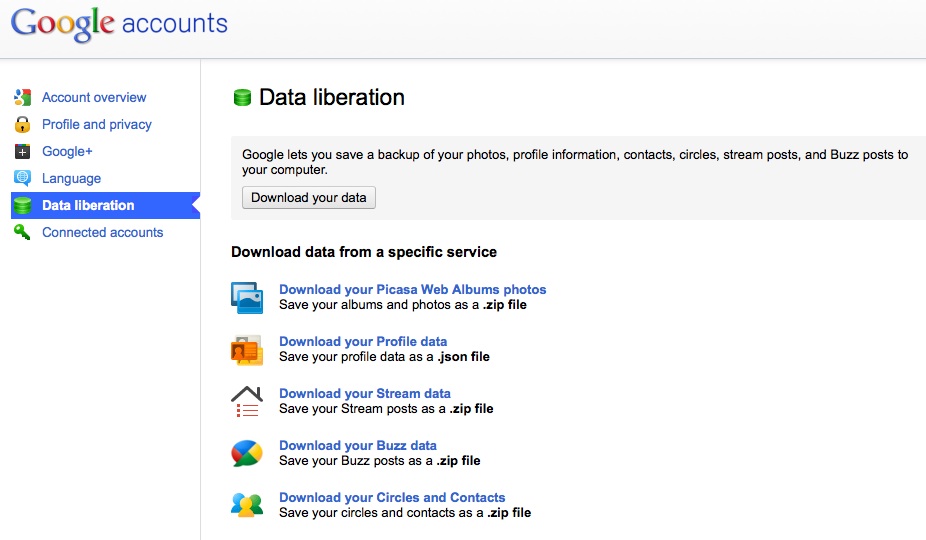
But for all the talk about “owning our data” that Facebook has really been instrumental in igniting, Google’s response is “data liberation.” Making the options for backing up and downloading your content and data explicit.
Privacy within the platform can be on a content by content basis. When you post a message, upload a photo or video, or share, you are given the option to select which of your “circles” are able to view it. Circles are how you organize your contacts. You can share with all of your circles, any specific one/s, or with the world, every time you post. You are also given the option to disable comments on something and/or disable the option for others to share/reshare what you post. This last bit of privacy/security flexibility will, I think, help people feel better about participating that were previously worried about sharing on Facebook for fear that people would push it across the network without them knowing.
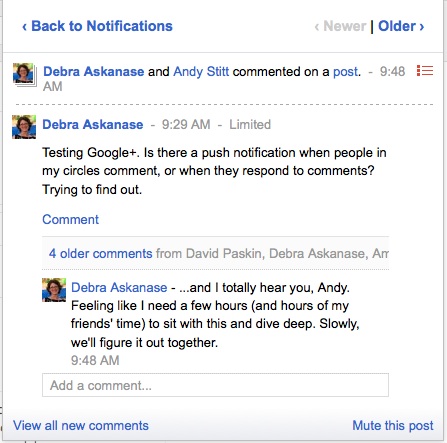
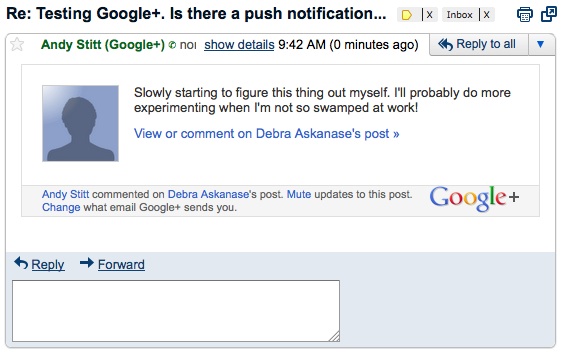
Google+ links for my account and my notifications appear in any of my Google account windows. But, the notifications are terrific in their streamlined functionality. You can click through to the actions and content without changing the page you are on – just flipping through the popup notification window itself. Though, you’ll see in these images (just like on Facebook), that when you comment or interact with a friend’s post, you can then be interacting with people who aren’t in your circles. (Note: I am connected directly with Debra, but not with Andy)
My Google+ profile automatically includes a Google Buzz tab to see the stream from that space. Google integration across all of the Google-owned spaces is pretty seamless, naturally. But, the social media landscape has changed over the years and people expect more flexibility, allowing social profiles on the web to interact. For example, people are talking about viewing their Google+ circles in Tweetdeck or Hootsuite where they can already view Twitter and Facebook. There’s also the integration for multimedia like YouTube (though, that’s Google property so maybe more hopeful there), Flickr, and things like Twitter and Twitpic.
Google+ and Facebook in Early Days
Whether this dates me in a good or bad way, or not: I was in college when Facebook first appeared. We could only see people at our university. But it allowed for some really organic networking across the platform with functionality that Facebook later dissolved. For example, because it was already limited to your school, the course lists were populated each semester into the platform – this let you select which classes you were in and then see the other students in your class, even if you weren’t friends directly. You could then share messages, notes, talk about class, etc. You were also able to see a more general flow of data on the platform.
In the early days of Twitter, the public stream contributed dramatically to users finding each other and people of interest to follow or just to communicate with.
The “incoming” stream on Google+ is it’s version of this wider stream, allowing users to surf across the platform to people they may not know but that are sharing content or updates publicly. I think that it is an important part of the platform at this early stage, but I think there will need to be more add-on functionality once we are past Day 1 of the trial period and the numbers of users skyrocket; the content will be too difficult to follow with too much happening. A Google+ equivalent for hashtags or other metadata filtering could make a public timeline something useful even with a huge number of participants.
Personal vs Professional
Because your contacts and the sharing are based on your “circles” I can see how Google+ could allow for more streamlined integration of a personal and professional profile. You can have everyone connected to you, without trying to say “I only have real friends on this social network” and limit which content goes to which circle. But, at least right now, you can still only have that one profile.
My work email address is managed by Google as we use Google Apps. I tried setting up an account on Google+ with that email but I was given an error message that said they do not support the additional domains yet. I am sure this is something they are building out though – both for the professional users and so that it expands who can use the platform since it requires a Gmail email address right now.
Options for Nonprofits
I haven’t found any organizations using Google+ yet with an organizational profile. And as I said above, the professional vs personal differentiation is yet to be defined by the platform. Without knowing just where Google is planning to go with these kinds of options or profiles, I can see a few options just built into the functionality:
Using “circles” for volunteers, donors, general supporters, etc. to more directly target content, asks, and engagement efforts
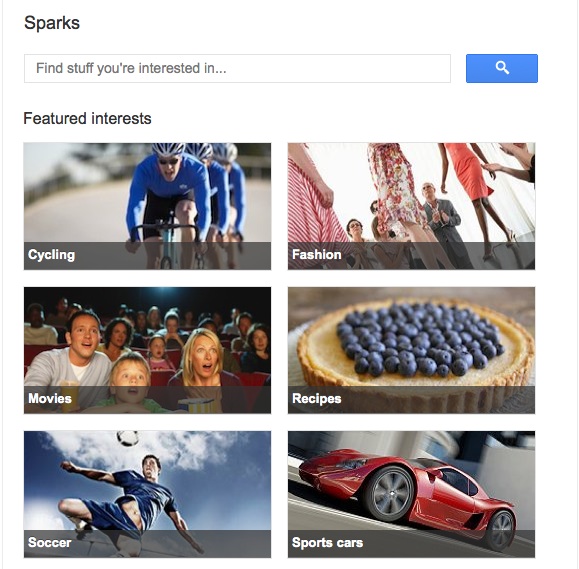
Having nonprofit organizations manage a Spark (the interest area aggregators):
Use the “hangouts” functionality, which allows for up to 10 users to group chat with video, for building trust and relationships with your community members. Imagine having a daily hangout with your organization’s leadership shared publicly through the network so anyone could join in, ask a question, etc – especially during a campaign or election cycle!
Resources
Here are a few resource links I’ve found helpful so far in the Google+ exploration process:
- How to import your Facebook friends to Google+
- Facebook friend export extension for Chrome
- Google+ Review on TechCrunch
- Google+ on Android
Have more resource links or blog posts to share? What are your concerns or reflections with Google+? Looking forward to hearing how your experience goes!
—– UPDATE
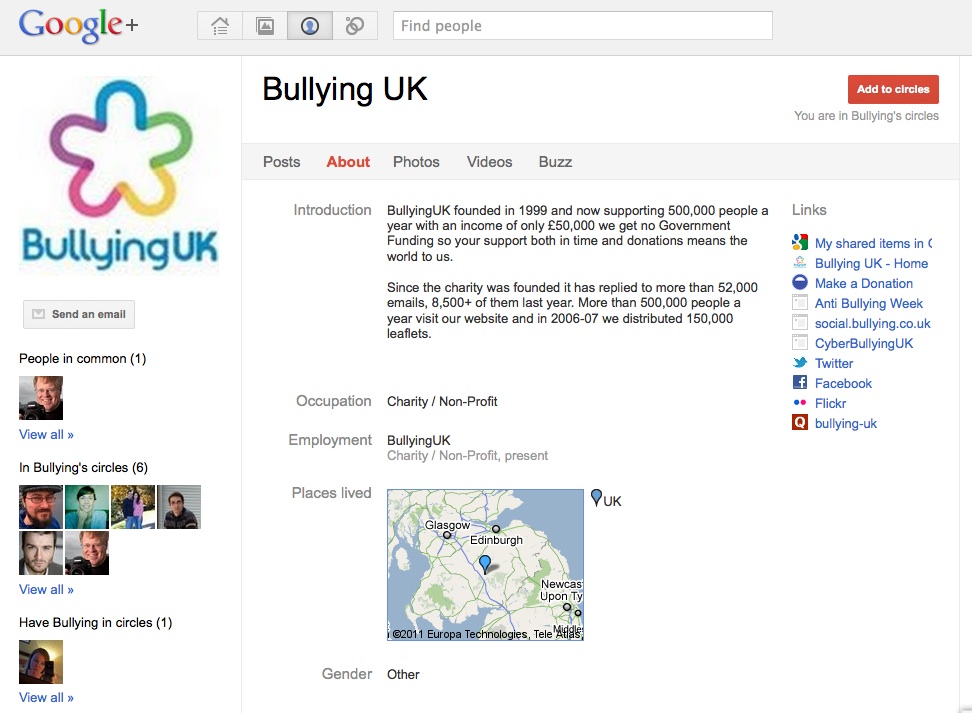
I’ve come across an organizational profile on Google+ now, my friends at BullyingUK – they are always on the edge of early adoption and I’m interested to see what they think of the new platform. So, far, it doesn’t show any posts from them but you can see how their profile looks and that their Buzz feed comes into the profile.
Personally, I think Google did a good job in learning from the failures of Google Wave – this looks promising. I think listserves and facebook profiles + pages will be around for a long time, but it’s nice to see this evolution.
Thanks, Jaki! I think you’re right – we aren’t going to see facebook or email lists close up shop just because Google may have finally figured out social networking 🙂 But, it is great to see more competition out there. One thing I didn’t include in this post but will have to do in a post of it’s own is the comparison between Google+ functionality and Diaspora, as I see A LOT of similarities.
Here’s another link (thanks to Matt Stempeck for pointing it out):
http://www.wired.com/epicenter/2011/06/inside-google-plus-social/
This does look promising. Thanks for the post, Amy. I’m curious about their roll-out – what’s their tipping point? It seems like they are reaching out to the right folks in order to generate “buzz” (no pun intended). I’m also curious about social networking saturation — will people want to join yet another social network? Fortunately for Google, Google + integrates with the rest of their platforms. When I signed up yesterday to receive an invite, I used my gmail account. And, I thought to myself, “What if I put in a Yahoo email account? Will they disown me from the system?” 😉
Thanks, Holly! I’m not sure how they are managing the roll out. I did not have an invitation “from Google” directly, per se, but it did come from a friend that works there (actually, they work on the Google+ team even) but only hours later received another ping from a friend as they joined up and he is in a very different “circle” to use the Google+ nomenclature. One thing to note is that there were no invitation limits. Normally, you join a new beta and there’s a 10 or 50 or whatever limit on who you invite to the platform. This time, it was just open! And then they were surprised when they were overloaded with requests to join? I think it’s open up again now though. Right now, you have to use your gmail email to join, but they do give you the option to do a Yahoo mail merge to find your contacts!
This does look promising. Thanks for the post, Amy. I’m curious about their roll-out – what’s their tipping point? It seems like they are reaching out to the right folks in order to generate “buzz” (no pun intended). I’m also curious about social networking saturation — will people want to join yet another social network? Fortunately for Google, Google + integrates with the rest of their platforms. When I signed up yesterday to receive an invite, I used my gmail account. And, I thought to myself, “What if I put in a Yahoo email account? Will they disown me from the system?” 😉
Hey there Amy,
This is a really great breakdown of Google’s most recent attempt to become a player in the social networking game. Once things get more settled the non-profits, artists, musicians, and other creative people will definitely be able to benefit from the technology.
Thanks, Sam – glad it’s helpful! I agree; right now it’s mostly tech fans that are setting up shop in Plus, but soon it will expand and once others are in there I think we will see much more of what the platform can do.
Very helpful write-up! All the BUZZ about Google+ initially made me want to WAVE from a save and faraway distance, but I’m enjoying it thus far.
I love it, Danielle! Your Google pun that is 🙂 You always have great insight on social tools as well so I’m looking forward to your reactions!
Oye. I’m excited about the platform, it’s flexibility with privacy, and integration with all things google. But google was very slow to migrate many of us using google apps rather than standard gmail. To where? I’m not exactly sure, but in this new place we can’t use things like buzz and google+ as Amy noted with the case of her work account. Hopefully they won’t be as slow to remedy this, but until they do, many of us won’t be able to participate.
More importantly — when they do open the door to apps users, will you be able to integrate your personal and work networks with a single identity? Given the admin and ownership of data within apps, I’m betting no. And if that’s the case, will the sharing and privacy within work/family/friend circles really matter? I wonder.
Hi Brewster – thanks for adding in to the conversation here! Really great questions about the Apps account users verses standard Gmail individual users. I think that the theoretical and practical discussion about integrating profiles on the web is not new but is maybe refreshed by Google+ simply because it seems to hold much more potential than previous platforms to be able to actually manage that merge. Obviously, none of us know at this point and we will have to wait and see. I’m curious though, since you brought it up, how you would want that to happen: would you really want all of your social presence on the web brought into one space? do you see the management of that content/data about yourself being easier if it is in one space vs distributed in various platforms? do you have qualms with professional and personal accounts (not even the profile) coming together?
Thanks for getting this started!
The way I see it (forgive me if I’ve reached too far with my assumptions) …
Many of us will always want niche tools and communities for some things, and a more global social space for our general web presence. There are exceptions, but this seems like what suits the majority of us. Facebook often fails us in the global social space by denying us control of how we share. Google+ seems like it has positioned itself to remedy this fact. Integration with email etc is a huge asset, but that becomes truly valuable when we also gain control over spheres of private and public sharing — this is its paradigm difference. It not about bringing our presence into one space, it’s about being able to use one platform for several overlapping purposes.
Amy, wonderful combination of “how-to” and analysis. I agree with @twitter-6462982:disqus that Google certainly seems to have learned from Wave. I’m waiting for the Google docs integration, and then I actually think it will be Wave+:-) One thing that really strikes me is that this may be a situation like Buzz, which had the potential to be used powerfully by organizations but all the clutter in there demoted its value. The hangouts has a lot of potential for taking that concept and making it personal – like bringing in a core group of leaders to discuss a campaign, for example. Am looking forward to testing this further with you and others (as is obvious by my early attempts to understand it – see screen shot above!)
Looking forward to more evaluations of this as it iterates and gains users.
Thanks, Debra! Happy to share 🙂 And I think there will be many more blog posts about + to come.
I agree that there are some early signs of ways organizations could use the platform. The biggest hurdle, in my opinion, is the fact that it is based on top of Google Accounts and doesn’t [yet?] support Google App domains, etc. But, I’m sure that isn’t news to Google!
Amy, wonderful combination of “how-to” and analysis. I agree with @twitter-6462982:disqus that Google certainly seems to have learned from Wave. I’m waiting for the Google docs integration, and then I actually think it will be Wave+:-) One thing that really strikes me is that this may be a situation like Buzz, which had the potential to be used powerfully by organizations but all the clutter in there demoted its value. The hangouts has a lot of potential for taking that concept and making it personal – like bringing in a core group of leaders to discuss a campaign, for example. Am looking forward to testing this further with you and others (as is obvious by my early attempts to understand it – see screen shot above!)
Looking forward to more evaluations of this as it iterates and gains users.
Amy, wonderful combination of “how-to” and analysis. I agree with @twitter-6462982:disqus that Google certainly seems to have learned from Wave. I’m waiting for the Google docs integration, and then I actually think it will be Wave+:-) One thing that really strikes me is that this may be a situation like Buzz, which had the potential to be used powerfully by organizations but all the clutter in there demoted its value. The hangouts has a lot of potential for taking that concept and making it personal – like bringing in a core group of leaders to discuss a campaign, for example. Am looking forward to testing this further with you and others (as is obvious by my early attempts to understand it – see screen shot above!)
Looking forward to more evaluations of this as it iterates and gains users.
I really loved that the options for Gender when you first create an account include “male” “female” and “other” — it’s a minor addition that makes a big difference for a lot of people.
Thanks for pointing that out, Claire! I totally agree 🙂
Want to explore Google+ more? Here’s an interactive demo: http://www.google.com/+/demo/
Amy I was in college when Facebook launched too. I had completely forgotten about the courses element! But gosh, you are right. That was so helpful for connecting with classmates to study. Ah, the good old days 🙂
Thanks for reminiscing with me, Cheryl! I think it’ll be interesting to see
how circles evolve as more users join Plus and want to have flexibility with
those groups.
There’s another nonprofit on Google+: Kaboom!
Profile here: http://t.co/wgb43Cr
Yep – I wish there was a way to make circles public, the way Twitter has
public and private lists. I’ve started a circle of nonprofit organizations
on Google+ for my own tracking (National Wildlife Federation is on there as
well) but I can’t share it with you all!
Thanks for deciphering this for me–I just joined & think I’ll be exploring in more depth over this weekend…!